How to Migrate from ARGUS or Excel: Steps, Timeline, and What Carries Over
Migrating from ARGUS or Excel to a CRE underwriting platform moves two things by file, the rent roll and the expense budget, and re-keys the rest: loans, recovery structures, market leasing assumptions, valuation and sale assumptions, and equity waterfall. A single property takes about a day; a ten-property book about a week. Solsten CRE imports rent rolls and expense budgets from Excel, including ARGUS Excel exports, through a guided column-mapping wizard.
Every migration guide for commercial real estate software skips the same sentence, so here it is first: there is no file that moves a complete underwriting model from one platform to another. Not from ARGUS, not from Excel, not between any two CRE platforms I know of. What moves by file is the data a building actually has, the rent roll and the expense budget. What gets re-keyed is everything you assumed about it.
That turns out to be fine, because re-keying the assumptions is the audit you were going to skip. This guide is the plan I would hand an analyst: what to export, how to clean it, what order to set things up in, what will not import and why, how to reconcile, and how long each size of book takes. It is written for Solsten CRE, which I build, but the first four steps apply to any platform you move to.
If you are here because of the ARGUS Enterprise end-of-life dates, the dates and the repricing are covered there. This is the part that comes after you decide to move.
What Actually Moves
| Item | Moves by file? | Where it comes from |
|---|---|---|
| Rent roll (tenant level) | Yes, Excel | ARGUS rent roll export or the rent roll tab of your model |
| Expense budget | Yes, Excel | ARGUS expense export, T-12, or the opex tab |
| Property facts (address, size, purchase price, dates) | No, form | The deal file |
| Loans | No, form | Term sheet or loan abstract |
| Recovery structures (NNN, base year stop, modified gross) | No, form | Lease abstracts |
| Market leasing assumptions | No, form | Your ARGUS market leasing profiles or model inputs tab |
| Valuation, hold period, and sale assumptions | No, form | Model inputs |
| Equity structure and waterfall | No, form | Operating agreement |
Two of the eight rows move by file. That ratio looks worse than it is: the rent roll and the expense budget are the two items with hundreds of cells, and the other six are a handful of numbers each. A loan is eight fields. A waterfall is a preferred return, a split, and a promote. The imports take the volume; the forms take the judgment.
Step 0: Inventory
Before exporting anything, make one list with a row per property and six columns: rent roll source, expense source, loan terms source, recovery structure source, market assumptions source, equity structure source. Fill in where each one lives (a file name, a tab, a lease abstract folder). Blank cells are the migration’s real work, and it is better to find them now than halfway through property six.
Then decide which properties move. Active holds and live deals move. Dead deals do not; archive their files and leave them. A migration is the one moment you get to shrink the book without anyone objecting.
Step 1: Export
From ARGUS Enterprise. Export the tenant-level rent roll report and the expense report to Excel. Use the detailed tenant report, not a summary, so each suite is its own row with its own dates and rent. If a report lands with a title block and subtotals above the header row, that is fine; you will clean it in the next step. Solsten does not read native ARGUS model files, so the Excel export is the path.
From Excel. Copy the rent roll tab and the expense tab into a new workbook, one sheet each, values only (paste as values so formulas do not come along). If your model keeps step increases, TI, and LC on separate tabs, bring them onto the rent roll sheet as columns keyed by suite. The import maps one row to one tenant, so everything about a suite needs to be on that suite’s row.
Step 2: Clean the Sheets
The import wizard reads a sheet with one header row and one record per row. Everything below is in service of that.
Rent roll rules
- One header row, no merged cells, no title block above it. Delete subtotal and total rows.
- One row per suite. Vacant suites get a row with a status of Vacant and no tenant name, so the model knows the space exists.
- Dates as dates, not text. Either lease start and end, or start and a term in years and months; the import calculates whichever one you leave out.
- The lease end date is the last day of occupancy. A five-year lease starting 1 January 2024 ends 31 December 2028, not 1 January 2029.
- Rent with its unit in a separate column: $/SF/YR, $/Month, or $/Annually. If the sheet mixes units, add the unit column before importing rather than converting by hand.
- Step increases as a unit (percent, $/SF/YR, $/Month, $/YR), an amount, and a timing (every year, every two years, or one increase at year one through four).
The wizard auto-detects headers against a long alias list, so you do not need to rename columns to a template. These are the columns it looks for and the ARGUS-flavored names it recognizes on sight:
| Field | Recognized headers include |
|---|---|
| Suite | Suite, Unit, Space, Premises, Space/Unit, Space/Suite |
| Tenant | Tenant, Tenant Name, Lessee, Occupant, DBA |
| Status | Status, Lease Status, Suite Status, Space Disposition, Occupancy |
| Area | Area, RSF, Rentable Area, Leased SF, Square Feet |
| Lease start / end | Lease Start, Commencement, Expiration, Lease End, Expires |
| Term | Term (Years), Term (Months) |
| Rent | Base Rent, Rental Rate, Contract Rent, In-Place Rent, Rent PSF |
| Rent unit | Base Rent Unit, $/SF/YR, $/Month |
| Free rent | Free Rent (Months), Abatement, Concession Period |
| Step increases | Step Increase Unit, Base Increase, Annual Escalation, Increase Timing |
| TI | TI Unit, TI Rate, TI Allowance, TI Timing |
| LC | LC Unit, LC Amount, Broker Commission, LC Timing |
| Recovery | Recovery, Recovery Type, CAM, NNN, Expense Stop, Reimbursement Type |
| Percentage rent | Percentage Rent Rate, Projected Gross Sales |
| Deposit | Security Deposit |
Status values are normalized as well. Month-to-Month, Holdover, and Sublease import as active occupants. Speculative imports as under contract, which is what an ARGUS speculative lease is. Dark and Available import as vacant.
Expense sheet rules
- One row per line item, with the annual amount in one column. If the source is a T-12 with twelve monthly columns, add a total column and import that; the model handles monthly timing itself.
- A column for expense type: Operating, Non-Operating, or Capital. Reserves and capital items belong below NOI, and this column is what puts them there.
- A column for payment basis: a single amount, an amount per rentable square foot, per occupied square foot, per custom area, or a percentage of effective gross income (management fees).
- A column for frequency: Monthly, Quarterly, Semi-Annual, Annual, or Property Tax in two installments with the two installment dates.
- Optional: percent fixed and percent recoverable per line, which drive the recovery calculation later.
The expense wizard recognizes GL-style headers (Account, GL Description, Line Item, Budget Line Item, Reimbursable Expense) as the expense name and Current Amount, Year 1, Annual Budget, and Growth Base as the amount, so an ARGUS expense export usually maps without renaming anything.
Both wizards offer a downloadable template with example rows. If a source file is a mess, pasting its values into the template is often faster than cleaning in place.
Step 3: Set Up the Property Shell, in Order
Solsten walks a property through ten pages in a fixed order: Property Highlights, Rates, Expenses, Recoveries, Market, Tenants, Revenues, Financing, Investment, Reports. The order is not cosmetic. Recovery profiles reference expense lines, so expenses come first. The tenant import asks for a market leasing profile on every row at the review step, so the Market page has to exist before you import tenants. Set up the pages in that order and the imports land on a model that is ready for them.
For the shell itself you need: address, property type, rentable area, purchase price, and acquisition date on the Property Highlights page, then the inflation rates, discount rate, credit loss, sale closing cost, and hold period on the Rates page. All of that is on the first page of any deal file.
Step 4: Run the Imports
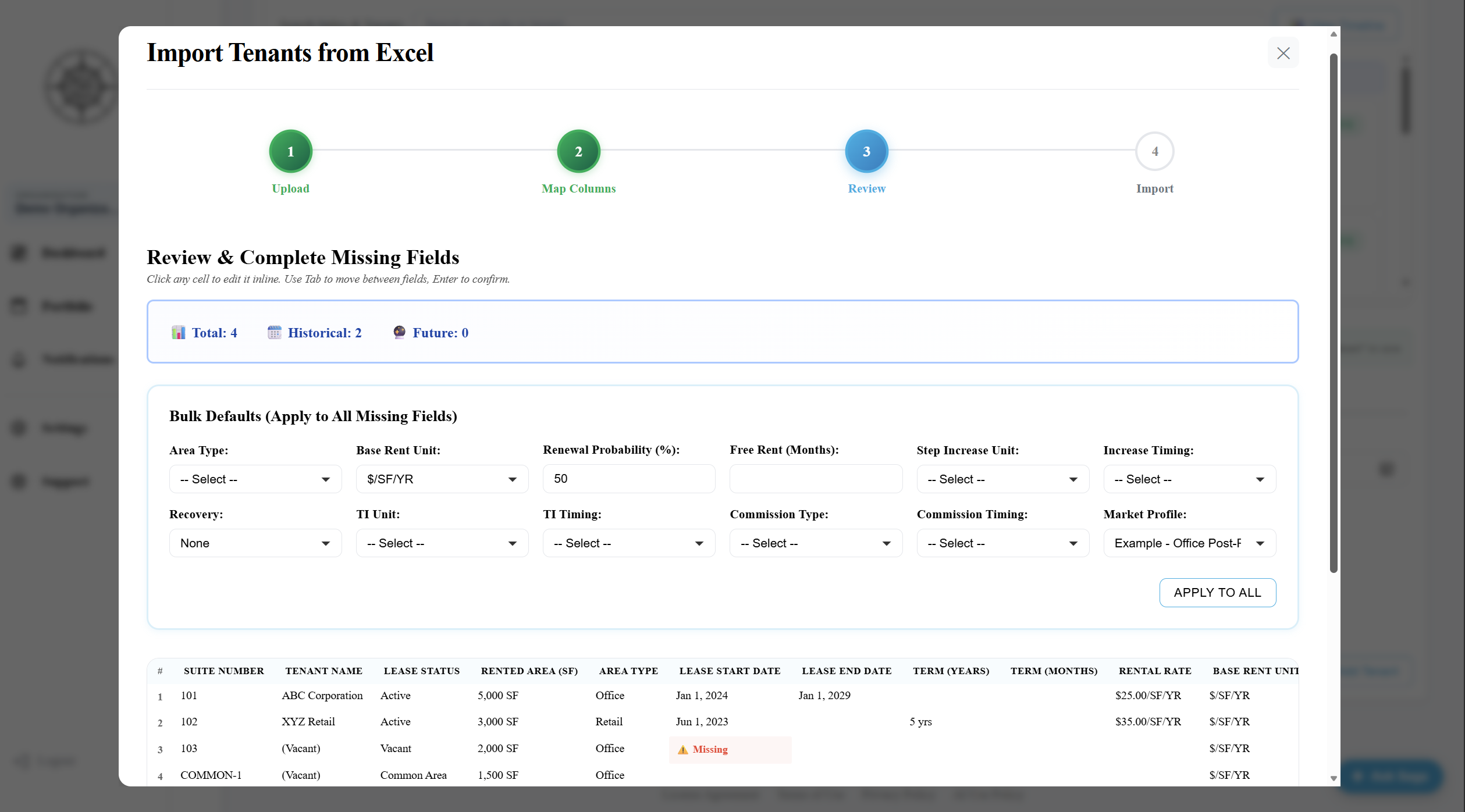
Expenses first, then tenants. Each wizard is the same four steps: upload the .xlsx or .xls file, confirm the auto-detected column mapping, review the rows with bulk defaults for anything the sheet did not carry (every tenant gets a market profile here, every expense gets a type if the sheet had none), then import.
Nothing is hidden at the review step. If a rent column mapped to the wrong field, you see it in the table before anything is written. Fix it in the wizard, or close it, fix the sheet, and upload again. An import that goes wrong costs a minute.
Step 5: Re-Key What Does Not Import
This is the part a migration estimate usually leaves out, so here is the full list with a rough time each.
- Recovery profiles (one per lease structure, not one per tenant): NNN, base year stop, or modified gross, with the expense lines each one recovers and any gross-up. Ten minutes per distinct structure. The recovery types explainer covers which is which.
- Market leasing assumptions (one per space type): market rent, downtime, renewal probability, new and renewal TI and LC, free rent, term. These are your ARGUS market leasing profiles by another name; copy them across. Ten minutes each.
- Loans: amount or percent down, rate, points, amortization, term, loan start and first payment dates, closing costs, and the fixed or variable rate terms. Five minutes per loan.
- Valuation and sale: valuation metric and value, sale closing cost, hold period, discount rate. Two minutes; these sit on the Rates page, so they are usually done before the imports.
- Equity structure and waterfall: investor list and ownership, preferred return, splits, promote tiers. Fifteen to thirty minutes if the operating agreement is at hand, longer if it is not.
Re-keying these is where the migration earns its keep. Every one of them is an assumption someone made at some point, and typing it again into a new form is the only time anyone will ask whether it is still true.
Step 6: Reconcile
Do not compare whole statements. Compare seven numbers, old model against new, for year one:
- Total rentable area and occupied area
- Scheduled base rent
- Recovery income
- Total operating expenses
- NOI
- Debt service and DSCR
- The lease expiration schedule by year
If all seven tie within a rounding tolerance, the migration is done for that property. If one does not, it is almost always one of four things: the old model’s analysis date (see below), a mid-month lease start that the two models prorate differently, a recovery profile that was attached to the wrong expense lines, or an expense that was imported as Operating when the old model carried it below the line. Each is a two-minute fix once you know which number is off.
Expect small, explainable differences in recovery income. Solsten grosses up only modified gross leases with a gross-up percentage, and it calculates recoveries from the expense lines the profile actually names. ARGUS and most Excel models have their own conventions. A difference you can explain is a reconciliation, not a problem.
The date of the old model matters more than anything above. An ARGUS file or an Excel model is frozen at its analysis date. Solsten runs on a fluid timeline: the model is always as of today. Projections roll forward as calendar time passes, a lease that expired last month has already become a vacant successor, a vacancy that outlasted its forecast has been extended, and inflation has compounded to the current date. So if the file you are migrating from was last run in March, the new model will not match it line for line in October, and it should not. The right comparison is either the old model re-run as of today, or the new model read at the old model’s analysis date. Before you call a variance a mapping error, check which of the two you are looking at.
Timeline and Cost
Working assumptions for one analyst with clean source files, not promises:
| Book size | Elapsed time | Where the time goes |
|---|---|---|
| 1 property | About a day | Cleaning the sheets, re-keying, reconciling |
| 5 to 10 properties | About a week | Same, plus one recovery and market profile set per asset type |
| 20 or more | Two to three weeks | Same, plus the inventory step actually matters |
The imports themselves are minutes. The time is cleaning, re-keying, and reconciling, in that order, and the cleaning shrinks fast once the first two or three source files have taught you what the wizard wants.
The software cost is on the pricing page; there is a free plan for the first property, which is also the right place to run the first migration before committing a book to it. There is no migration fee. The real cost is the analyst time above, and the way to cap it is the next section.
Run Both for One Cycle
Keep the old model alive, read-only, through one full reporting cycle after the new one is up: one month of actuals, one lender report, one investor statement. Compare the outputs at each event. After that, archive the old file. Two live models of the same property drift within a quarter, and then nobody knows which one the lender saw.
If You Are Coming From Excel Specifically
Two things change that have nothing to do with the data.
First, the custom tabs do not come. The scenario toggle that only you understand, the sensitivity grid built in 2019, the macro that refreshes the comps: none of that has a home in a platform, and it should not. Keep the workbook for one-off analyses that no platform models. Move the property.
Second, the model stops being a file. It is a record with sharing controls and an activity log that records every change, which means the question “which version did we send” has an answer. For a two-person shop that has been emailing v3_FINAL_FINAL.xlsx, that is most of the value, and it arrives on day one of the migration regardless of how long the rest takes. The Excel versus underwriting software page goes into where spreadsheets break at deal complexity; this guide is only about getting across.
Related Articles
- ARGUS Enterprise End of Life: Every Date - The schedule and the repricing that start most migrations
- How to Analyze a Rent Roll - What a clean rent roll looks like before it is imported
- How to Read a T-12 Operating Statement - The expense source most migrations start from
- NNN Lease Recovery Analysis - The recovery structures you will re-key in Step 5
- ARGUS vs Solsten: Feature by Feature - What is the same and what is different once you are across
Explore Solsten
- Excel Import - The import wizard, step by step
- ARGUS Alternative Comparison - Six options side by side, including the ones that compete with us
- CRE Underwriting Software - The full platform the migration lands on
- Plans and Pricing - Free for one property; run the first migration there
I build Solsten CRE, so weigh the platform-specific parts accordingly. The first four steps, inventory through clean sheets, are the same work whichever platform you choose, and the reconciliation list is worth running against any new model, including one you build yourself.
Frequently asked questions
- What migration steps are required to move from ARGUS or Excel to another underwriting platform?
- Seven steps, numbered 0 to 6: inventory which properties and models are moving; export the rent roll and expense budget to Excel; clean each sheet to one header row and one row per suite or line item; set up the property shell in the new platform in its required order; run the imports and review the column mapping; re-key the items that do not travel by file (loans, recovery structures, market assumptions, valuation and sale assumptions, waterfall); then reconcile the new model against the old one on a short tie-out list.
- How long does a migration from ARGUS or Excel take?
- For one analyst with clean source files: a single property in about a day, five to ten properties in about a week, and twenty or more in two to three weeks. The import of a rent roll or expense sheet takes minutes; the time goes into cleaning the source, re-keying assumptions, and reconciling. Budget a parallel run of one reporting cycle before retiring the old model.
- What carries over from ARGUS and what has to be re-entered?
- The tenant-level rent roll (suite, tenant, status, area, dates or term, rent and unit, free rent, step increases, TI, LC, recovery basis, percentage rent, deposit) and the expense budget (line item, amount, type, payment basis, frequency, dates, fixed and recoverable percentages) carry over by Excel file. Loans, recovery profiles, market leasing assumptions, valuation and sale assumptions, and the equity waterfall are entered in forms. There is no file format that moves a complete model between CRE platforms.
- Can Solsten import ARGUS files directly?
- Solsten imports Excel files (.xlsx and .xls), including the rent roll and expense reports that ARGUS Enterprise exports to Excel. It does not read native ARGUS model files. The import wizard auto-detects common ARGUS export column names such as Space/Unit, Suite Status, and Space Disposition, and treats Month-to-Month, Holdover, and Sublease rows as active occupants and Speculative rows as under contract.
- How much does migrating from Excel-based underwriting cost?
- The software cost is the subscription, which is on the pricing page. The real cost is analyst time: roughly a day per property for a complete, reconciled model, less for simple single-tenant assets and more for large multi-tenant rent rolls with complex recoveries. There is no separate migration fee for a self-serve import.
- Why does the new model not match my ARGUS or Excel file line for line?
- Usually because of the date. An ARGUS or Excel model is frozen at its analysis date; Solsten runs on a fluid timeline and is always as of today, so expired leases have already rolled to vacant successors, overdue vacancies have been extended, and inflation has compounded to the current date. Compare the old model re-run as of today, or the new model read at the old analysis date, before treating a variance as a mapping error. The other common causes are mid-month proration, a recovery profile attached to the wrong expense lines, and a capital item imported as an operating expense.
- Should I keep my Excel models after migrating?
- Keep them read-only for one full reporting cycle as the reconciliation baseline, then archive them. Excel still has a place for one-off analyses that no platform models, but the system of record for the property should be one place, otherwise the two drift and nobody knows which one the lender saw.
Try Solsten Free
See everything we discussed in action — no credit card required.
Start Your Free AnalysisRelated Articles
ARGUS Enterprise End of Life: Every Date, and What Each One Actually Means
ARGUS Enterprise version 13 comes off ARGUS Cloud on 31 December 2026. Here are the dates Altus published, what each one changes in practice, and what your options are if you are still on it.
ARGUS vs Solsten: A Feature-by-Feature Comparison for CRE Professionals
Detailed feature-by-feature comparison of ARGUS Enterprise and Solsten for CRE analysis. See where each platform excels, pricing differences, and which is right for your workflow.
What Is Effective Gross Income (EGI) in Commercial Real Estate?
Understand Effective Gross Income (EGI) in CRE — how it's calculated, why it matters more than PGI, and how vacancy, credit loss, and other income affect your underwriting.